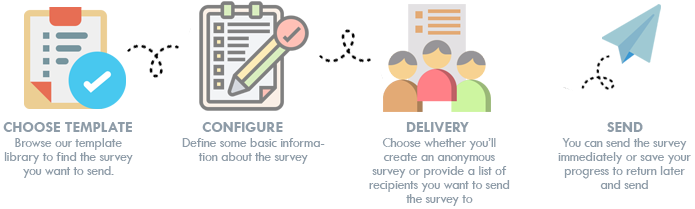
If your facility has added our Survey application into AMSHub, you’ll have the ability to create and send surveys. If you’re interested in adding this feature, please contact your Archer Sales Rep for details.
Creating a survey is simple with our survey wizard. You can get started by going to My Surveys and selecting the Send New Survey button, or by browsing the various pre-built surveys available in Templates and clicking the one you’d like to use.
The AMS survey application lets you use our pre-built survey templates to quickly survey a population without having to go through the tedious exercise of building the survey itself. There is an art and science to crafting survey questions and responses, and our surveys have been carefully engineered to effectively communicate and gather data. We have a large library of surveys and we’re adding additional templates all the time. You can also use any of our templates as a starting point to build your own survey template. Clone any of our templates and you’ll immediately be able to begin making changes to all aspects of the template that you can then save and use any time.
We also offer comparative survey templates that let you gather responses and compare them to others in your industry using AMSHub. Find our more here.
After selecting the template you’d like to use, you’ll provide a name which is only used to help you track your surveys, this information is not visible to users. Next you’ll choose your delivery option. We offer two kinds of surveys: Targeted and Anonymous. If you have a collection of specific people with email addresses/phone numbers* you’d like to survey, you’ll use Targeted. If you want to have a link on your website, or add a link to an email communication, that you want anyone and everyone to complete, you’ll use Anonymous. For Targeted surveys, will track every user and you can monitor who has started, abandoned, completed, etc. For Anonymous surveys, you’ll be able to see how many people have started, abandoned, etc. but not which specific people. It’s important to think carefully about which option you’ll use.
If you choose to send a Targeted survey, you’ll need to have your list of email addresses/cell phone numbers* ready when building your new survey. You can cut-and-paste these into the wizard or upload them from a csv or text file. You can also create a recipient list to use to simplify sending surveys.
Step 4 is customizing the email/SMS message. This step is only applicable to sending Targeted surveys. We also have a pre-built template that is used by default to distribute your survey. Step 4 gives you the option to modify the text that appears in your email/SMS message* when sent.
The final step is to confirm all information is completed and to decide if you want to immediately send your survey or save the survey to send at a later date. And that’s it! In either case, as soon as you send your survey our application will immediately email to all users – in the case of Targeted surveys – or immediately provide you with a link to the survey you can use – in the case of Anonymous surveys. Once users begin to receive and respond, you’ll be able to view survey results and start learning.
*if you have added the ability to send surveys using SMS