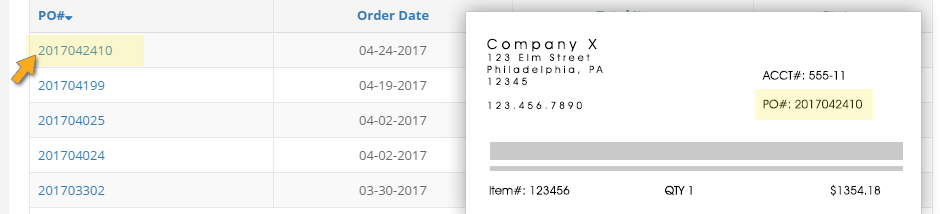
Every Order created in AMSHub is automatically assigned a PO# which is supplied to the vendor with the order details. That PO# should be reflected on their packing list when a delivery arrives.
When you go to the Delivery section of the site you’ll see a list of PO#s for all pending orders. A pending order is an order that has been placed but not all ordered items have been received. Simply click the PO#, noted on the bill of materials included in this shipment, to get started.
Clicking that PO# will bring you to the scan screen where you can immediately begin scanning barcodes from the packaging of each received item. When you scan a barcode our system will check the item details against the order to reconcile the information to ensure only items that were ordered are received and that the quantities are correct. It will add the specific item details such as expiration date and lot number to the system automatically and you can immediately scan the next item.
When you’re done scanning items from this shipment, click the Update button. If all items from the current PO# have now been received, the Order will automatically be marked complete/Delivered. If there are still items remaining from the order it will remain pending and stay visible on the Delivery screen to be completed when another delivery arrives that includes that item.